Exploring Windows Phone 7's XDE and Image
Today I played with the Windows Phone 7 SDK again. Found that the emulator has been renamed to xde.exe instead of the old Device Emulator. For someone who likes to dig deep, my first interest isn’t the complex .NET libraries and APIs, but what WP7 really is. Let me run some tests and explore this XDE and the OS image in the SDK.
1. About XDE
The official documentation about XDE should be this page:
Windows Phone Emulator
http://msdn.microsoft.com/en-us/library/ff402563(v=VS.92).aspx
But it provides very little information. Almost nothing useful. The old Device Emulator was an open-source project (more accurately, shared source, download at: http://www.microsoft.com/downloads/en/details.aspx?FamilyID=FAA8C81D-7316-4461-A0ED-6C95B261DDCD&displaylang=en). Unfortunately, XDE didn’t inherit Device Emulator’s glorious tradition. It’s closed source. To uncover deep secrets, we have to dig ourselves.
XDE’s default installation directory is C:\Program Files (x86)\Microsoft XDE\1.0. Looks familiar? Just like the old Device Emulator. Even the “1.0” folder name is the same. Device Emulator v3.0 still had a “1.0” folder. Confusing. If you’re rebuilding the emulator, this should have been changed long ago. Let’s compare the help of both emulators.
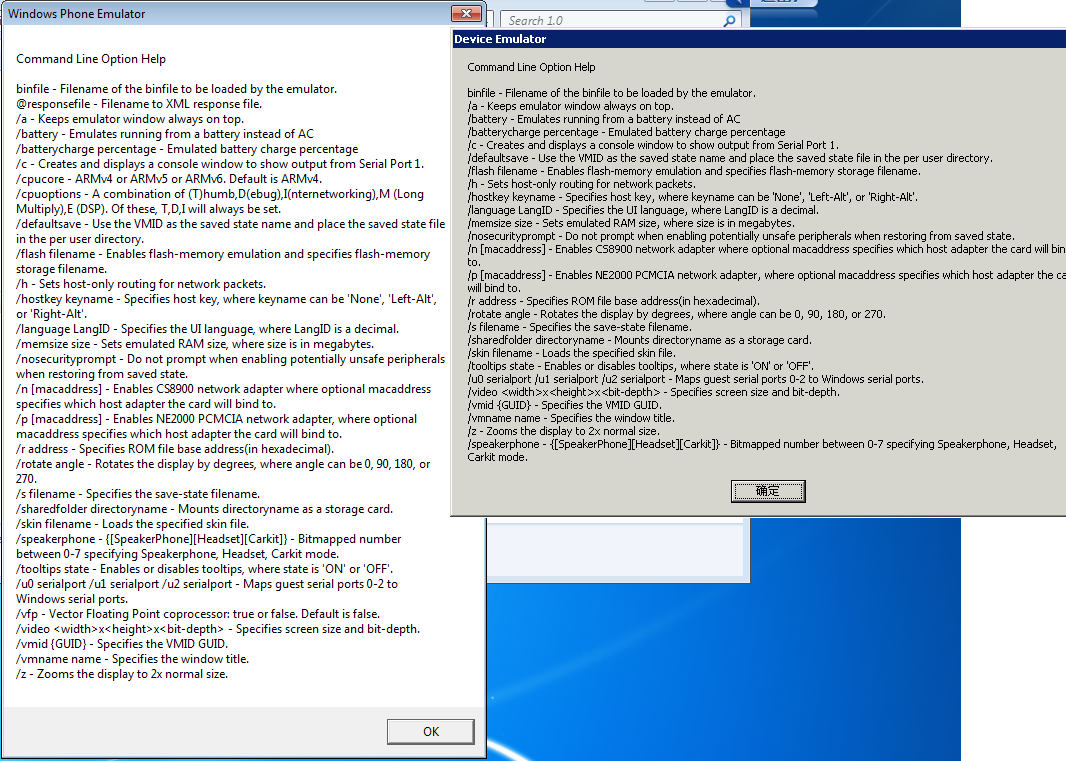
Left is XDE.exe’s help, right is Device Emulator’s help. Clearly, 80% is identical. The only change is simulating different ARM processor versions (v4, v5, v6). So XDE is also an ARM-based emulator? Could it be an improved version of the traditional Device Emulator? If you think that, Microsoft has fooled you. Launch XDE from the command line: “xde.exe [image name]” to start the emulator. Try some parameters: /c, /z, etc. are completely invalid. Ha! It’s just hanging a sheep’s head but selling dog meat. Fooling the innocent.
Dig deeper into the directory. Two files are interesting: D3DCompiler_42.dll and X86CoreSystem.dll. Making one think. WP7 uses Silverlight. Using the old ARM emulator would be like an old ox pulling a broken cart. Anyone who did Silverlight development on CE6 R3 knows the pain. To fix the efficiency problem, WP7’s emulator had to go a different route. How to improve emulator efficiency? Just algorithmic optimization would kill you. Two effective approaches: GPU acceleration and hardware virtualization. WP7’s emulator uses both. These technologies are great, but the biggest problem: doesn’t that mean the emulator can only simulate x86? For WP7, it’s not a big deal. Since only managed code development is allowed, it doesn’t matter whether the emulator is x86 or ARM. To the application, it’s all intermediate code. So is the emulator x86? Let’s find out.
2. About the OS Image in the Emulator
Everyone knows WP7 is based on Windows CE. But CE has been wrapped layer upon layer until it doesn’t look like CE anymore — almost like Android and Linux. What version of CE is it based on? What’s inside? Let’s dig deep.
The emulator’s ROM is at C:\Program Files (x86)\Microsoft SDKs\Windows Phone\v7.0\Emulation\Images, called WM70c1.enus.bin. It doesn’t say nk.bin, but it follows Windows CE OS Image naming conventions. 120+ MB. On top of a clean CE base (about 20-30MB), they’ve added a lot. Let’s unpack this file and see what’s inside. The tool is Platform Builder for Windows CE 6 (the new CE7 hasn’t been released yet). PB6’s biggest advantage is graphically opening bin files, eliminating the need for viewbin.exe. Incidentally, using viewbin on this bin file confirms its architecture is x86!!! I won’t show the process.
Let’s try it ourselves, using official tools, not unofficial ones. Open the bin file directly in VS2005 with PB extension. Unpack successful! This proves WP7 still uses the standard CE bin file format. Real devices probably use nb0 or nbh format. Ah, Microsoft, this bin format has been studied inside out by bad actors. No wonder the emulator got unlocked just days after release.
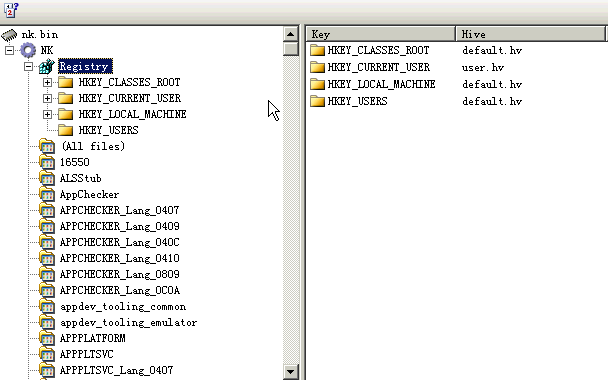
From the ROM content, it’s a typical CE OS. Let’s see what’s interesting in the registry.
First, HKEY_LOCAL_MACHINE\Drivers\BuiltIn. All the drivers are for the emulator — virtual peripherals. Nothing practical.
Let’s check the startup items, HKEY_LOCAL_MACHINE\init:
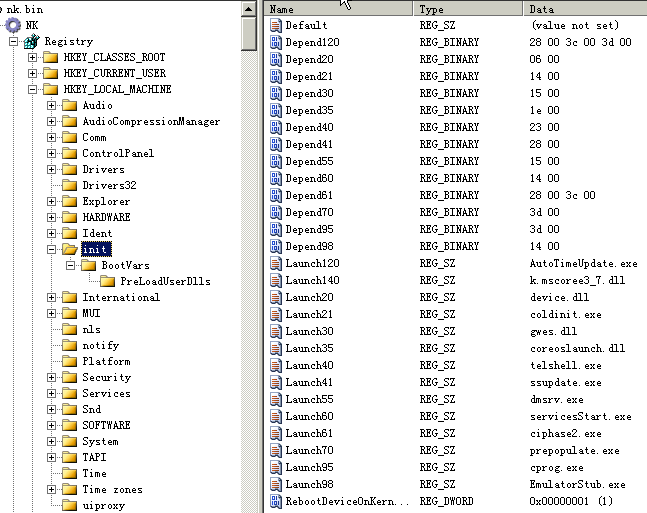
This is WP7’s startup sequence. gwes.dll, device.dll are standard components. The familiar explorer.exe is not there, obviously. Otherwise you’d get a standard Windows desktop. I’d guess the main WP7 UI is called telshell.exe. Could be wrong without a real device. The last loaded item is interesting: k.mscoree3_7.dll. Things starting with “k.” are in the kernel. Has Microsoft finally put the .NET VM into the OS kernel? This could solve problems NETCF couldn’t address before.
More fun stuff: what version is .NET Compact Framework? The registry says: 3.7. Does this version officially exist? Does it? Doesn’t it?
Many familiar files. Dumpbin confirms they’re x86. The emulator is definitely x86-based. As for the CE version, it shows 7.0.xxx. Since CE7 isn’t released yet, but WP7 is, this must be an “internal build.”
IE browser is native code. Not cool, Microsoft. “The magistrate may burn down his house, but the commoners cannot light their lamps.” You allow yourselves native code but won’t let us use P/Invoke?
Of course, most is managed code — NETCF37 libraries. Can be dumped and decompiled with Reflector. In the decompiled code, you see P/Invoke again. Shameless.
I’ll stop here. Writing more looks increasingly like hacking. I don’t hack — no time, no motivation. Some details are intentionally vague. Being more specific would lead to mischief. Sorry.
Summary (many may already know, but I verified through practice):
- XDE is an x86 emulator using hardware virtualization and DX for GPU acceleration.
- The emulator ROM is standard CE bin format. OS is internal build CE7 with .NET Compact Framework 3.7.
- WP7’s “sandbox” is at the NETCF VM layer, not the OS layer. Bypass the VM, and you’ve got a standard CE.
- Personally, WP7’s model resembles Android’s (the底层 OS could have been Linux too…), but it’s more closed off at every level. Of course, these days “closed” isn’t necessarily a bad word.
- A real device would let me play with so much more.