Driving AI Agents Like Cattle
Preface
Three years ago when GPT first came out, I wrote a post called ChatGPT Writes Tetris. Back then there were no Agents — you could only ask ChatGPT to write code, then copy it into an IDE yourself. But AI has evolved incredibly fast. Now we have all kinds of Agents that can search for information, write code, look up documentation when stuck, run code, check results, and iteratively fix things. It’s like having an AI assistant — tell it to do something, and it goes off and does it. For programmers especially, this is a huge gift. We can offload repetitive work to AI and focus on more creative tasks (I don’t think AI will replace coders).
Also, a quick rant about Chinese translations. “Agent” gets translated as “智能体” (intelligent entity), which sounds super sci-fi but doesn’t really explain what it does. I think “代理” (proxy/agent) would be better, but that’s too technical and also conflicts with “proxy.” In English, “agent” is a common word — it’s something that acts on your behalf. Like a real estate agent. So why not just call it “中介” (middleman/agent)? Of course, that doesn’t sound academic enough. Same thing with “Socket” being translated as “套接字” — in English it just means an electrical socket. And Windows “Handle” became “句柄” — when really it’s just a door handle. Windows is called Windows because of windows, and a Handle is the handle that lets you operate that window. Some translations sound fancy but make things harder to understand than just using the English term.
Anyway, on to the main topic.
The Failed Attempt with Gemini CLI (Or: Too Expensive)
There are plenty of commercial AI Agents now — Google’s Gemini CLI, Anthropic’s Claude Code, etc. But they all cost money. Sure, they have free tiers, but those run out fast. For personal use, the cost adds up quickly. Before you know it, your wallet’s empty and you’ve barely written any code. I tried Gemini CLI and it was pretty good, but soon it told me my free quota was exhausted and asked for credit card info. I gave up. Not worth the risk.
Why burn so many tokens? Because I have this blog — the one you’re reading now — with over 200 articles, generated by Pelican, a Python-based static site generator. I’ve been using it for 10 years. Back in 2017 when I first arrived in New Zealand and hadn’t started working yet, I was bored and migrated my blog from WordPress to Pelican. Why Pelican? Because I only knew Python at the time — Ruby and other languages were beyond me. I spent about a week in the library migrating everything, writing helper scripts along the way. Never expected it to last 10 years.
Why migrate again now? Because Pelican is basically in maintenance mode — updates are rare, and themes are even rarer. Everything looks outdated. Jekyll, on the other hand, has an active community, tons of themes, and frequent updates. Probably because GitHub Pages natively supports Jekyll. I also use Jekyll at work for public documentation — we write in Jekyll and host on GitHub Pages. So I wanted to move my blog to Jekyll too.
I actually tried migrating with an AI Agent a year ago, using Gemini CLI. It ran out of tokens before finishing, but its performance impressed me. Unlike ChatGPT which generates code through conversation, Gemini CLI takes a high-level command like “migrate my blog from Pelican to Jekyll” and then autonomously analyzes it, explores the situation, searches for info, writes code, runs it, checks results, and iterates until done. Zero manual intervention needed. Despite the token exhaustion, I was very satisfied with its capability.
First Attempt
Agentic AI is hot again, especially with projects like OpenClaw that let AI fully control your computer. I’m not brave enough for that, but letting AI write code is fine — that’s what source control is for. So I decided to try the blog migration again, this time with a local model to avoid token costs.
I had access to a Dell DGX Spark at the university. 128GB unified LPDDR5x memory, NVIDIA GB10 GPU. It’s a performance beast from NVIDIA that looks like a cheap all-in-one but packs serious power. Its architecture is similar to Apple’s MacBook Pro with Apple Silicon — ARM CPU with shared memory GPU. Here are the specs:
~$ nvidia-smi Thu Feb 19 11:16:29 2026 +-----------------------------------------------------------------------------------------+ | NVIDIA-SMI 580.95.05 Driver Version: 580.95.05 CUDA Version: 13.0 | +-----------------------------------------+------------------------+----------------------+ | GPU Name Persistence-M | Bus-Id Disp.A | Volatile Uncorr. ECC | | Fan Temp Perf Pwr:Usage/Cap | Memory-Usage | GPU-Util Compute M. | | | | MIG M. | |=========================================+========================+======================| | 0 NVIDIA GB10 On | 0000000F:01:00.0 Off | N/A | | N/A 39C P8 3W / N/A | Not Supported | 0% Default | | | | N/A | +-----------------------------------------+------------------------+----------------------+ +-----------------------------------------------------------------------------------------+ | Processes: | | GPU GI CI PID Type Process name GPU Memory | | ID ID Usage | |=========================================================================================| | No running processes found | +-----------------------------------------------------------------------------------------+ $ lscpu | grep -i model Model name: Cortex-X925 Model: 1 Model name: Cortex-A725 Model: 1 $ free -h total used free shared buff/cache available Mem: 119Gi 7.9Gi 15Gi 920Ki 98Gi 111Gi Swap: 15Gi 226Mi 15Gi Running local GPT-OSS and Gemma models on this machine, the token generation speed is mind-blowing. Your eyes can’t keep up. Perfect for running Agents.
For the software, commercial options like Claude Code and Gemini CLI only work with their own models. I chose OpenCode instead — it supports almost any model you can think of: free ones via Ollama and LMStudio, paid ones from Gemini, Anthropic, DeepSeek, Alibaba, even Xiaomi (I didn’t know Xiaomi sold tokens either). It’s fully open-source and extremely active — updates almost daily.
I went with a local model called Qwen3 Coder Next, a code-specialized version of Qwen3. I picked qwen3-coder-next:q8_0, an 8-bit quantized model at 85GB — fits nicely in the 128GB memory. Presumably more powerful than the default 4-bit version. I initially tried Gemma 3 (Google’s open-source Gemini), but it wasn’t built for coding and struggled with tool calls, so I switched to the code-focused model.
Let’s go. First, clone the blog source from GitHub, cd into the directory, launch opencode. It integrates well with Ollama — no extra configuration needed. Then I gave it the command:
This is my personal blog, which is generated by Pelican, a static site generator based on Python. I want to migrate it to Jekyll, which is another static site generator based on Ruby. Please help me to do this migration. The Agent’s response to the first instruction surprised me. It didn’t just start working. Instead, it analyzed the command, thought about migration steps, wrote a TODO list, analyzed what each step required, and only then started working. That’s better than many junior programmers — when I started coding decades ago, I’d open the IDE and start typing immediately, often getting stuck halfway and having to rewrite everything. This Agent plans before it acts.
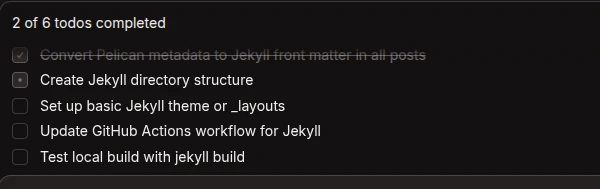
The first wave took about half an hour, then it reported completion. I wasn’t watching the whole time but glanced occasionally. What impressed me was that it wrote small Python scripts to automate the migration — converting Pelican config files to Jekyll format, transforming metadata formats. It didn’t manually edit each file one by one. Writing a script is more token-efficient and faster. This reminded me of when I migrated from WordPress to Pelican 10 years ago — I also wrote several Python scripts to extract posts from the WordPress database and convert them. Pretty clever.
After it reported done, I told it to spin up a local server for preview. That’s when the real adventure began.
Iteration Hell
Without a preview environment, the AI just changes things, assumes it’s done, and reports completion. With a preview server, it can actually test its work. After starting the server, it used curl to access pages and inspect the HTML. It doesn’t have eyes (coder models generally lack vision), but parsing HTML gives a rough picture.
My first request: “This default Minima theme is too plain — just one column. Can you switch to a better one?” The AI recommended several, and I picked Chirpy. It downloaded the theme, updated the config, and restarted the server. Then came token hell. It needed to install dependencies for the theme but kept hitting package conflicts — version mismatches, dependency hell reminiscent of Windows DLL hell. It kept trying, uninstalling, reinstalling, hitting permission issues between system and user packages. I was busy with other things and didn’t stop it. When I came back from shopping, it was still stuck on package installation. I don’t know how many approaches it tried. I finally told it: “You have 30 more minutes, then we go to plan B.”
Half an hour later, it admitted defeat. It even suggested I drop this theme entirely — “I can’t do it, master.” Like a programmer saying “this feature can’t be done.” I agreed and had it revert to the plain theme. By then I checked OpenCode’s stats: over 100 million tokens used. Shocking.
Later I discovered OpenCode has a free model you can use unlimitedly, called “Big Pickle” (obviously an alias — like GitHub Copilot’s “Raptor”). I switched to the free model and gave it a list of tasks:
- Jekyll’s URLs differ from Pelican’s — external links from search engines will break. Can you match the old URL format?
- Math formulas don’t render. Missing config?
- Dark/light mode toggle doesn’t work.
- Internal links to other blog posts have wrong URLs.
- Some JavaScript/CSS doesn’t load, breaking features.
- Can you add my analytics tracking link?
- No pagination — hundreds of posts on one page. Can you add it?
- Code highlighting doesn’t wrap lines. Fix?
- Copy button on code blocks doesn’t work.
- Image sizes are all wrong — too large.
- On mobile, it switches to single-column mode but the toggle button doesn’t work.
- Search bar doesn’t respond.
- Clean up legacy Pelican files.
- I have several GitHub Actions for auto-building, deploying to Firebase, and building a Docker container. Can you update them for Jekyll?
- Fix typos in 20 years worth of blog posts…
These smaller tasks went much faster. Most were easy to verify — the AI could start the server, test its changes, and confirm they worked. That self-verification loop is crucial.
Deploying to GitHub Pages was smooth. But CloudFlare deployment hit a snag — turns out CloudFlare doesn’t support UTF-8 filenames by default, requiring two environment variables to tell it the blog is UTF-8 encoded. The Agent couldn’t figure this out despite multiple attempts. Google Gemini eventually solved it. At one point, the Agent was so stuck it suggested I ditch CloudFlare and use GitHub Pages, Netlify, or Vercel instead. When I told this to Gemini, it said: “That’s like suggesting you ride a bike when your car’s windshield cracks.” Apt analogy.
The Chirpy theme was eventually made to work — not by Qwen3 Coder Next, but by the free Big Pickle model. I told it to switch themes, and Big Pickle downloaded a local copy, deployed it, and fixed issues directly. It worked within a short time.
Afterword
All in, it took about 10 days. Unlike the Tetris experience where I eventually had to write code myself, this time I didn’t write a single line (I don’t know Ruby anyway). I was basically a project manager or user — giving commands and feedback. The AI Agent handled most of it surprisingly well.
I won’t claim AI Agents will replace programmers, but they can definitely take over repetitive or mechanical work. Key lesson learned: when the AI is stuck, stop it immediately. Otherwise you get this:
$ opencode stats ┌────────────────────────────────────────────────────────┐ │ OVERVIEW │ ├────────────────────────────────────────────────────────┤ │Sessions 10 │ │Messages 2,197 │ │Days 8 │ └────────────────────────────────────────────────────────┘ ┌────────────────────────────────────────────────────────┐ │ COST & TOKENS │ ├────────────────────────────────────────────────────────┤ │Total Cost $0.00 │ │Avg Cost/Day $0.00 │ │Avg Tokens/Session 22.7M │ │Median Tokens/Session 1.4M │ │Input 158.1M │ │Output 286.7K │ │Cache Read 68.5M │ │Cache Write 0 │ └────────────────────────────────────────────────────────┘ 150 million tokens is no joke. I showed this to Gemini and asked how much it would’ve cost with ChatGPT. It estimated over $3000 USD. “That’s a mid-range GPU burned through, or a month’s salary for a programmer.”
It reminded me of a class I took 25 years ago in university — computerized accounting. The professor said the biggest barrier to adoption in China was cost. A small business owner would say: “I can hire an accountant for 800 RMB a month, and I can yell at them when I’m unhappy. Why would I spend tens of thousands on software that I can’t yell at?”
The same logic applies to Agentic AI. If I fire my programmers and make AI my cattle, who do I yell at when things go wrong? The AI just says “You are absolutely right.”
Of course, all of this will change. AI Agent technology keeps advancing, prices will drop, and someday we’ll truly have AI as our workhorses. I don’t think Agents will fully replace programmers, but they can certainly take over a lot of the grunt work, freeing us up for more creative endeavors.