ChatGPT Writes Tetris
ChatGPT has been blowing up lately. Hype-men say it can write code, pass the US bar exam, even replace humans. I think that’s exaggerated. My view: ChatGPT often confidently spouts nonsense. It might be good for creative work (drawing, fiction — where truth doesn’t matter), but for fact-checking, it falls short. The right attitude is knowing what this tool can and can’t do. Just like power drills — they’re a huge improvement over hand tools, but you wouldn’t say a drill replaces every woodworking tool. Use it for what it’s good at, use something else for what it’s not. Same with ChatGPT. Today, let’s see what ChatGPT can create.
Starting simple: a little game. Tetris is straightforward — everyone’s played it, many beginners have written it. I remember learning to program in 2000 with Visual Basic 6, dragging controls onto a form to make a playable block game. Now let’s try with ChatGPT.
Step 1
Opened ChatGPT, asked:
can you please write a Tetris game in python for me? It replied instantly:
Certainly! I can provide you with a basic implementation of the Tetris game in Python. Keep in mind that this implementation may not include all advanced features or graphics, but it should give you a good starting point. Here's the code: Then came pages of code:
import pygame import random # Initialize the game pygame.init() # Set up the display screen_width, screen_height = 800, 600 play_width, play_height = 300, 600 block_size = 30 top_left_x = (screen_width - play_width) // 2 top_left_y = screen_height - play_height # Colors (RGB format) WHITE = (255, 255, 255) BLACK = (0, 0, 0) RED = (255, 0, 0) GREEN = (0, 255, 0) BLUE = (0, 0, 255) CYAN = (0, 255, 255) MAGENTA = (255, 0, 255) YELLOW = (255, 255, 0) ORANGE = (255, 165, 0) PURPLE = (128, 0, 128) # Define the shapes of the tetrominoes S = [['.....', '.....', '..00.', '.00..', '.....'], ['.....', '..0..', '..00.', '...0.', '.....']] Z = [['.....', '.....', '.00..', '..00.', '.....'], ['.....', '..0..', '.00..', '.0...', '.....']] I = [['..0..', '..0..', '..0..', '..0..', '.....'], ['0000.', '.....', '.....', '.....', '.....']] O = [['.....', '.....', '.00..', '.00..', '.....']] J = [['.....', '.0...', '.000.', '.....', '.....'], ['.....', '..00.', '..0..', '..0..', '.....'], ['.....', '.....', '.000.', '...0.', '.....'], ['.....', '..0..', '..0..', '.00..', '.....']] L = [['.....', '...0.', '.000.', '.....', '.....'], ['.....', '..0..', '..0..', '..00.', '.....'], ['.....', '.....', '.000.', '.0...', '.....'], ['.....', '.00..', '..0..', '..0..', '.....']] T = [['.....', '..0..', '.000.', '.....', '.....'], ['.....', '..0..', '..00.', '..0..', '.....'], ['.....', '.....', '.000.', '..0..', '.....'], ['.....', '..0..', '.00..', '..0..', '.....']] shapes = [S, Z, I, O, J, L, T] shape_colors = [GREEN, RED, CYAN, YELLOW, BLUE, ORANGE, PURPLE] class Piece(object): rows = 20 columns = 10 def __init__(self, column, row, shape): self.x = column self.y = row self.shape = shape self.color = shape_colors[shapes.index(shape)] self.rotation = 0 def create_grid(locked_positions={}): grid = [[BLACK for _ in range(Piece.columns)] for _ in range(Piece.rows)] for row in range(Piece.rows): for column in range(Piece.columns): if (column, row) in locked_positions: color = locked_positions[(column, row)] grid[row][column] = color return grid def convert_shape_format(piece): positions = [] shape_format = piece.shape[piece.rotation % len(piece.shape)] for row in range(len(shape_format)): for column in range(len(shape_format[row])): if shape_format[row][column] == '0': positions.append((piece.x + column, piece.y + row)) for i, pos in enumerate(positions): positions[i] = (pos[0] - 2, pos[1] - 4) return positions def valid_space(piece, grid): accepted_positions = [[(column, row) for column in range(Piece.columns) if grid[row][column] == BLACK] for row in range(Piece.rows)] accepted_positions = [position for sublist in accepted_positions for position in sublist] formatted_shape = convert_shape_format(piece) for pos in formatted_shape: if pos not in accepted_positions: if pos[1] > -1: return False return True def check_lost(positions): for pos in positions: x, y = pos if y < 1: return True return False def draw_text_middle(surface, text, size, color): font = pygame.font.SysFont('comicsans', size, bold=True) label = font.render(text, 1, color) surface.blit(label, (top_left_x + play_width/2 - (label.get_width()/2), top_left_y + play_height/2 - label.get_height()/2)) def draw_grid(surface, grid): for row in range(Piece.rows): for column in range(Piece.columns): pygame.draw.rect(surface, grid[row][column], (top_left_x + column*block_size, top_left_y + row*block_size, block_size, block_size)) pygame.draw.rect(surface, RED, (top_left_x, top_left_y, play_width, play_height), 4) def clear_rows(grid, locked): full_rows = [] for row in range(Piece.rows): if BLACK not in grid[row]: full_rows.append(row) for full_row in full_rows: del grid[full_row] grid.insert(0, [BLACK for _ in range(Piece.columns)]) for row in full_rows: for position in range(Piece.columns): if (position, row) in locked: del locked[(position, row)] return len(full_rows) def draw_next_shape(piece, surface): font = pygame.font.SysFont('comicsans', 30) label = font.render('Next Shape', 1, WHITE) x = top_left_x + play_width + 50 y = top_left_y + play_height/2 - 100 shape_format = piece.shape[piece.rotation % len(piece.shape)] for row in range(len(shape_format)): for column in range(len(shape_format[row])): if shape_format[row][column] == '0': pygame.draw.rect(surface, piece.color, (x + column*block_size, y + row*block_size, block_size, block_size), 0) surface.blit(label, (x + 10, y - 30)) def draw_window(surface, grid, score=0): surface.fill(BLACK) pygame.font.init() font = pygame.font.SysFont('comicsans', 60) label = font.render('Tetris', 1, WHITE) surface.blit(label, (top_left_x + play_width/2 - (label.get_width()/2), 30)) # Score font = pygame.font.SysFont('comicsans', 30) label = font.render('Score: ' + str(score), 1, WHITE) x = top_left_x - 200 y = top_left_y + 200 surface.blit(label, (x + 20, y + 160)) for row in range(len(grid)): for column in range(len(grid[row])): pygame.draw.rect(surface, grid[row][column], (top_left_x + column*block_size, top_left_y + row*block_size, block_size, block_size)) pygame.draw.rect(surface, RED, (top_left_x, top_left_y, play_width, play_height), 4) draw_grid(surface, grid) def main(): locked_positions = {} grid = create_grid(locked_positions) change_piece = False run = True current_piece = Piece(5, 0, random.choice(shapes)) next_piece = Piece(5, 0, random.choice(shapes)) clock = pygame.time.Clock() fall_time = 0 fall_speed = 0.27 level_time = 0 score = 0 while run: grid = create_grid(locked_positions) fall_time += clock.get_rawtime() level_time += clock.get_rawtime() clock.tick() if level_time/1000 > 5: level_time = 0 if fall_speed > 0.12: fall_speed -= 0.005 if fall_time/1000 > fall_speed: fall_time = 0 current_piece.y += 1 if not (valid_space(current_piece, grid)) and current_piece.y > 0: current_piece.y -= 1 change_piece = True for event in pygame.event.get(): if event.type == pygame.QUIT: run = False pygame.display.quit() if event.type == pygame.KEYDOWN: if event.key == pygame.K_LEFT: current_piece.x -= 1 if not valid_space(current_piece, grid): current_piece.x += 1 elif event.key == pygame.K_RIGHT: current_piece.x += 1 if not valid_space(current_piece, grid): current_piece.x -= 1 elif event.key == pygame.K_DOWN: current_piece.y += 1 if not valid_space(current_piece, grid): current_piece.y -= 1 elif event.key == pygame.K_UP: current_piece.rotation += 1 if not valid_space(current_piece, grid): current_piece.rotation -= 1 shape_positions = convert_shape_format(current_piece) for i, pos in enumerate(shape_positions): x, y = pos if y > -1: grid[y][x] = current_piece.color if change_piece: for pos in shape_positions: p = (pos[0], pos[1]) locked_positions[p] = current_piece.color current_piece = next_piece next_piece = Piece(5, 0, random.choice(shapes)) change_piece = False score += clear_rows(grid, locked_positions) draw_window(win, grid, score) draw_next_shape(next_piece, win) pygame.display.update() if check_lost(locked_positions): run = False draw_text_middle(win, "You lost!", 80, WHITE) pygame.display.update() pygame.time.delay(2000) win = pygame.display.set_mode((screen_width, screen_height)) pygame.display.set_caption('Tetris') main() I skimmed it — uses the pygame library. Saved it as a .py file and ran it. It actually worked. With scoring, different colors for different blocks. Pretty surprising.
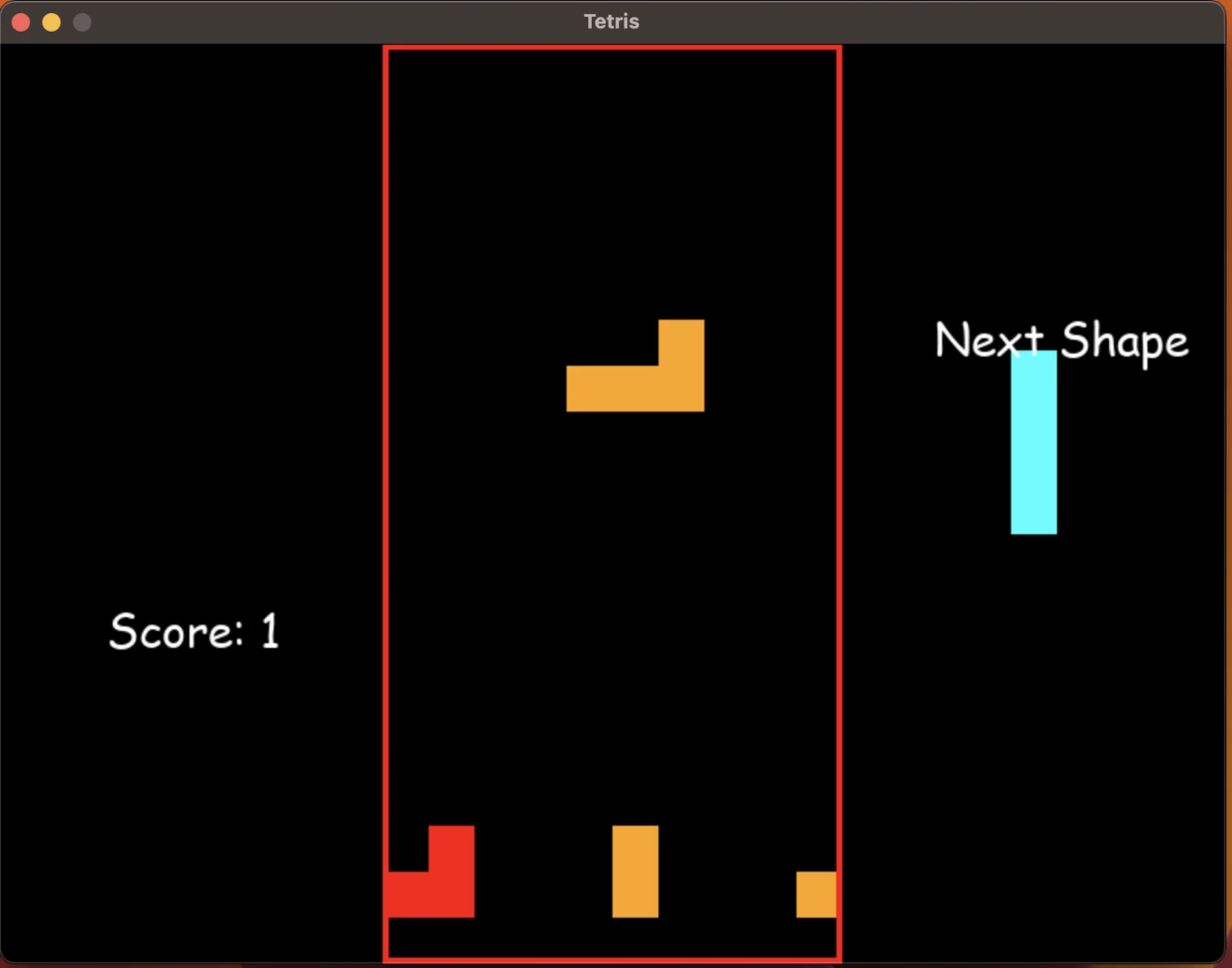
But problems showed up fast. When a row was filled and cleared, the blocks above didn’t fall down — they just hovered in mid-air.
Fixing It
I hadn’t looked at the code yet, so I asked ChatGPT:
your clear_rows has a bug, after a row is cleared, the other blocks won't fall ChatGPT, always humble, immediately admitted fault — even when it might be right.
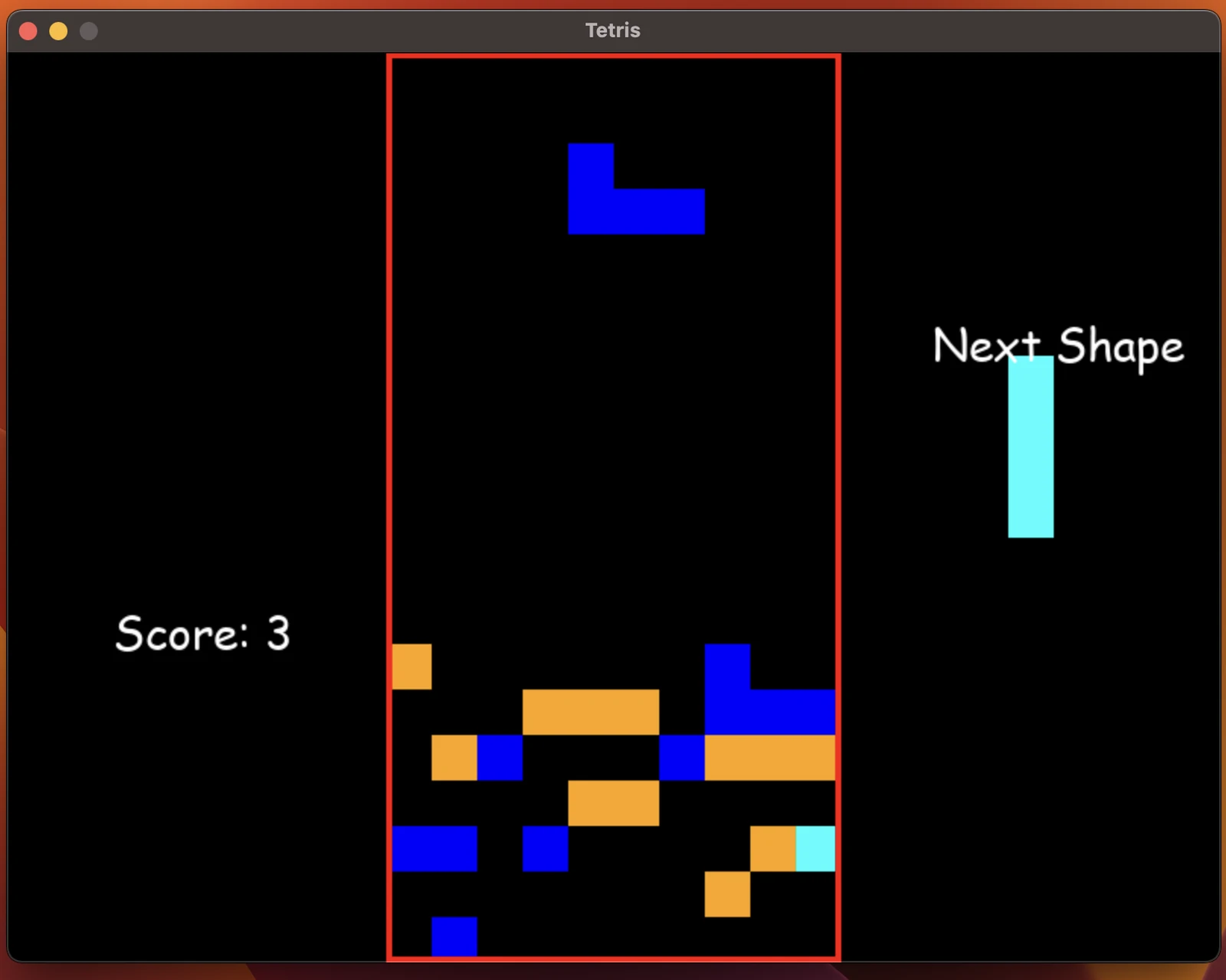
Apologies for the oversight. You're right; there is a bug in the clear_rows function that prevents the blocks from falling after a row is cleared. Here's an updated version of the clear_rows function that fixes the issue: def clear_rows(grid, locked): full_rows = [] for row in range(Piece.rows): if BLACK not in grid[row]: full_rows.append(row) for full_row in full_rows: # Clear the row del grid[full_row] grid.insert(0, [BLACK for _ in range(Piece.columns)]) # Update the positions of the locked blocks for row in range(len(grid)): for column in range(len(grid[row])): if grid[row][column] != BLACK: if (column, row) in locked: del locked[(column, row)] locked[(column, row + len(full_rows))] = grid[row][column] return len(full_rows) Still didn’t read the code. Replaced the function and ran it. Worse. The cleared row turned into garbage.
Kept at it. ChatGPT gave several more versions — some crashed, some had weird issues. Here’s version 5:
def clear_rows(grid, locked): full_rows = [] for row in range(Piece.rows): if BLACK not in grid[row]: full_rows.append(row) for full_row in full_rows: del grid[full_row] grid.insert(0, [BLACK for _ in range(Piece.columns)]) # Update the positions of the locked blocks new_locked = {} for position, color in locked.items(): x, y = position if y < full_rows[0]: new_locked[(x, y + len(full_rows))] = color else: new_locked[(x, y)] = color return len(full_rows), new_locked Still crashed. I finally got annoyed enough to read the code. The function returns a tuple but the caller expected an int. I told ChatGPT:
this is even worse. when a block drop I got this error: Traceback (most recent call last): File "/Users/zhe203/dev/playground/PyTetris/main.py", line 453, in <module> main() File "/Users/zhe203/dev/playground/PyTetris/main.py", line 437, in main score += clear_rows(grid, locked_positions) TypeError: unsupported operand type(s) for +=: 'int' and 'tuple' you can not return a tuple for clear_rows. because in your code score += clear_rows(grid, locked_positions), you're expecting to return an integer ChatGPT fixed it quickly:
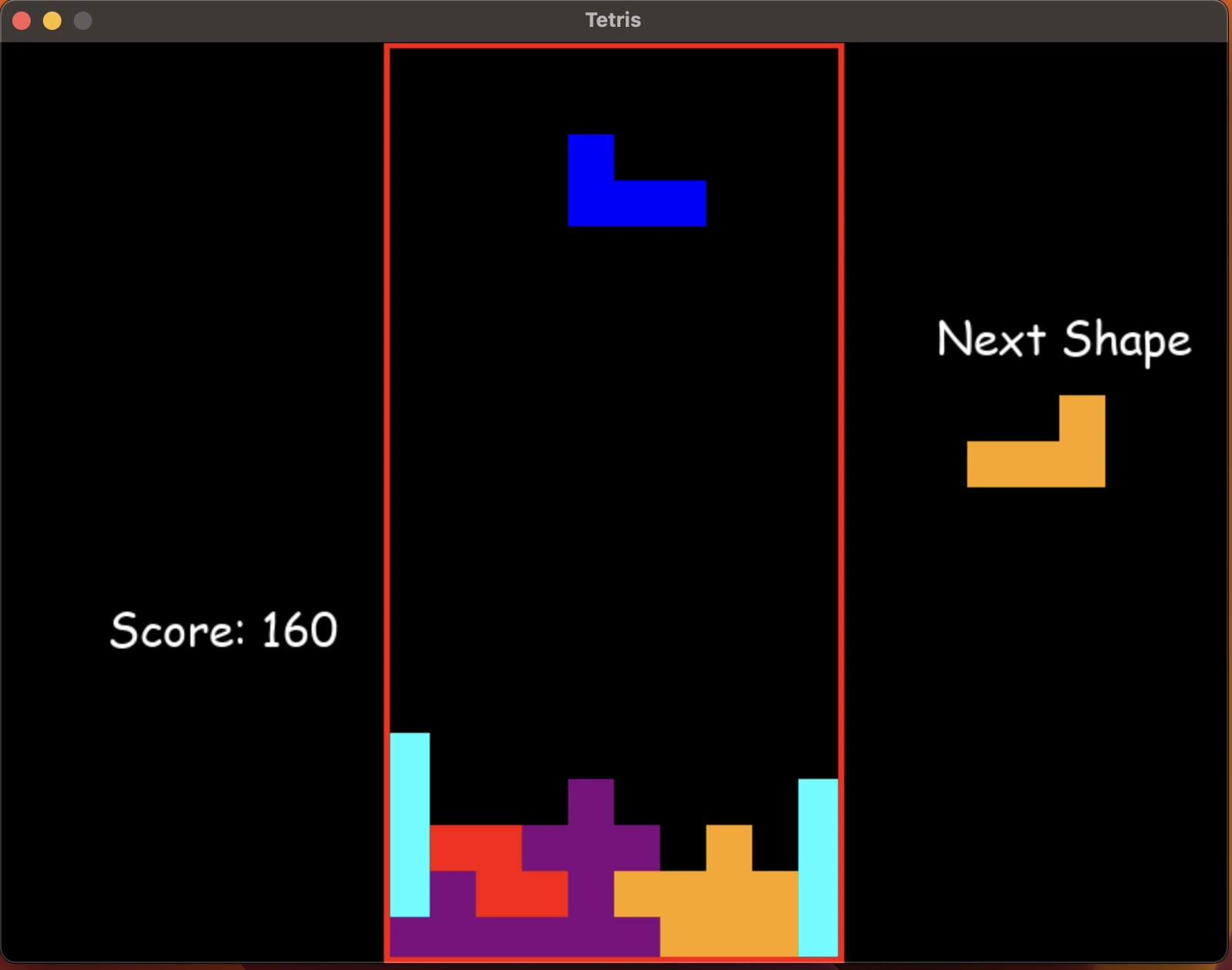
def clear_rows(grid, locked): full_rows = [] for row in range(Piece.rows): if all(grid[row]): full_rows.append(row) if len(full_rows) > 0: for row in full_rows: del grid[row] grid.insert(0, [BLACK] * Piece.columns) # Update the positions of the locked blocks new_locked = {} for position, color in locked.items(): x, y = position if y not in full_rows: if y < max(full_rows): new_locked[(x, y + len(full_rows))] = color else: new_locked[(x, y)] = color return len(full_rows) return 0 Now it was playable. But still buggy — a full row wouldn’t clear, it’d just keep stacking up.
After 5 versions wasting a lot of time, I gave up on ChatGPT fixing it. Finally read the code myself.
Reading the Code
ChatGPT’s generated code was actually decent — basic logic in place, comparable to a junior programmer. The bug wasn’t hard to find with a debugger. I fixed it in 2 lines:
(earn, locked_positions) = clear_rows(grid, locked_positions) score += earn * 10 Since ChatGPT was so keen on returning a tuple, I just called it like a tuple. The second line was auto-added by GitHub Copilot — ChatGPT gave 1 point per cleared row, but another GPT-4-powered AI decided it should be 10. I left it.
Summary
ChatGPT can boost productivity. Writing Tetris from scratch would’ve taken me 2+ hours. With GPT’s code as a base, just fix the issues and you’re done.
But using its output directly for work or homework? That’d be tough. Too many issues. And getting it to fix things isn’t always quick. You still need to read code, understand it, find and fix bugs — that takes real skill.
Copilot knows its kind well. While I was writing this, it pointed out all the flaws in ChatGPT’s code.
